
justine trieu



Reimagining the activity log
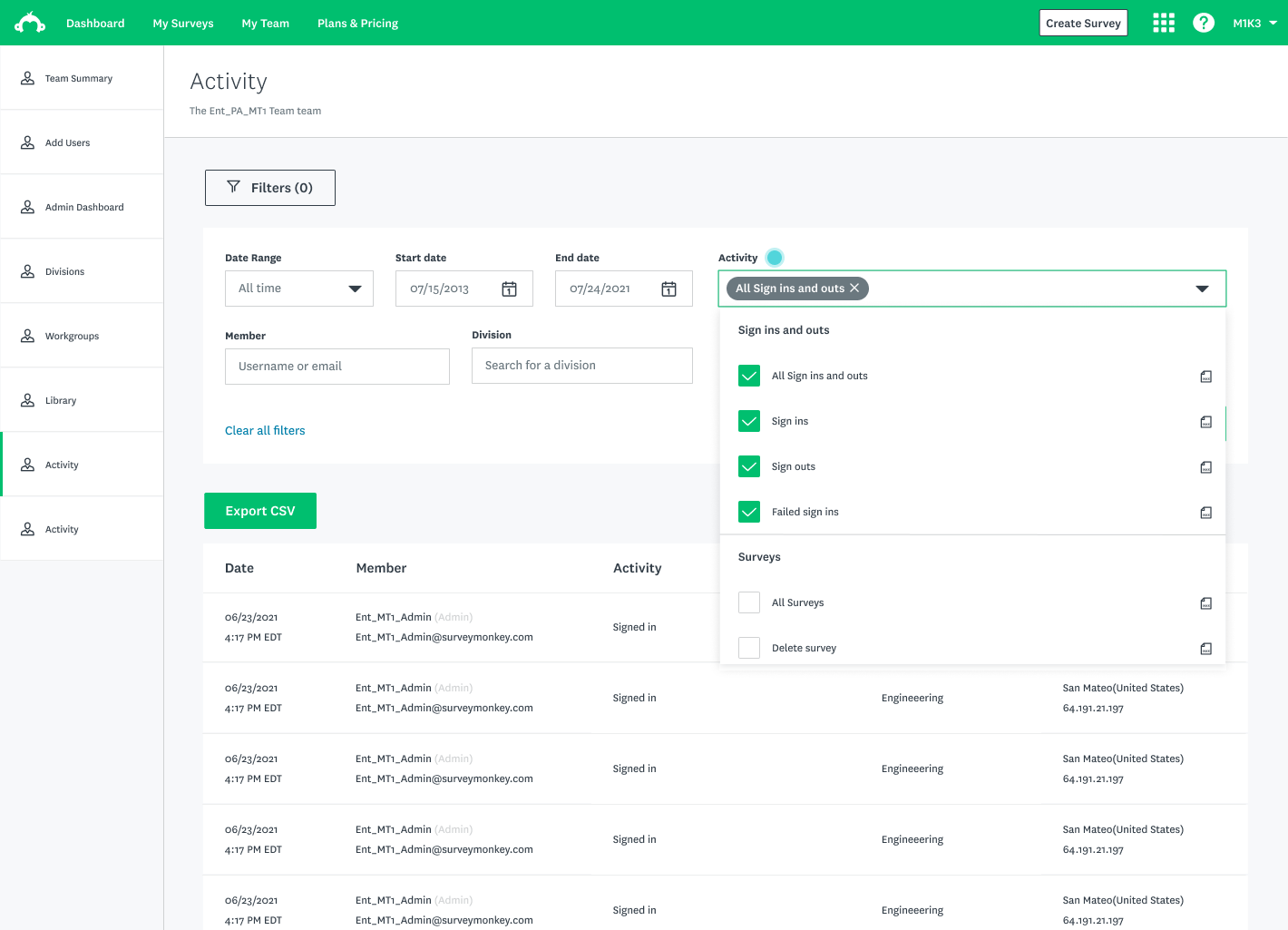
As a Product Design Intern, I championed a redesign project of the Activity Log to migrate it to the new design system, increase design efficiency for future migrations, and make it more functional for tens of thousands of Enterprise Admins.
Throughout these four months, I got the opportunity to plan and conduct research studies, lead meetings with cross-functional partners, and see a design to ship.
Role
Product Design Intern
Type
B2B Saas Web
Responsibilities
User Research, Content Design, Concept Testing, Design Systems, Wireframing & Prototyping
Tools
Figma, Abstract, Google Drawing
The Problem
How might we make the Activity Log more functional for Enterprise admins?
CURRENT STATE
What is the activity log?
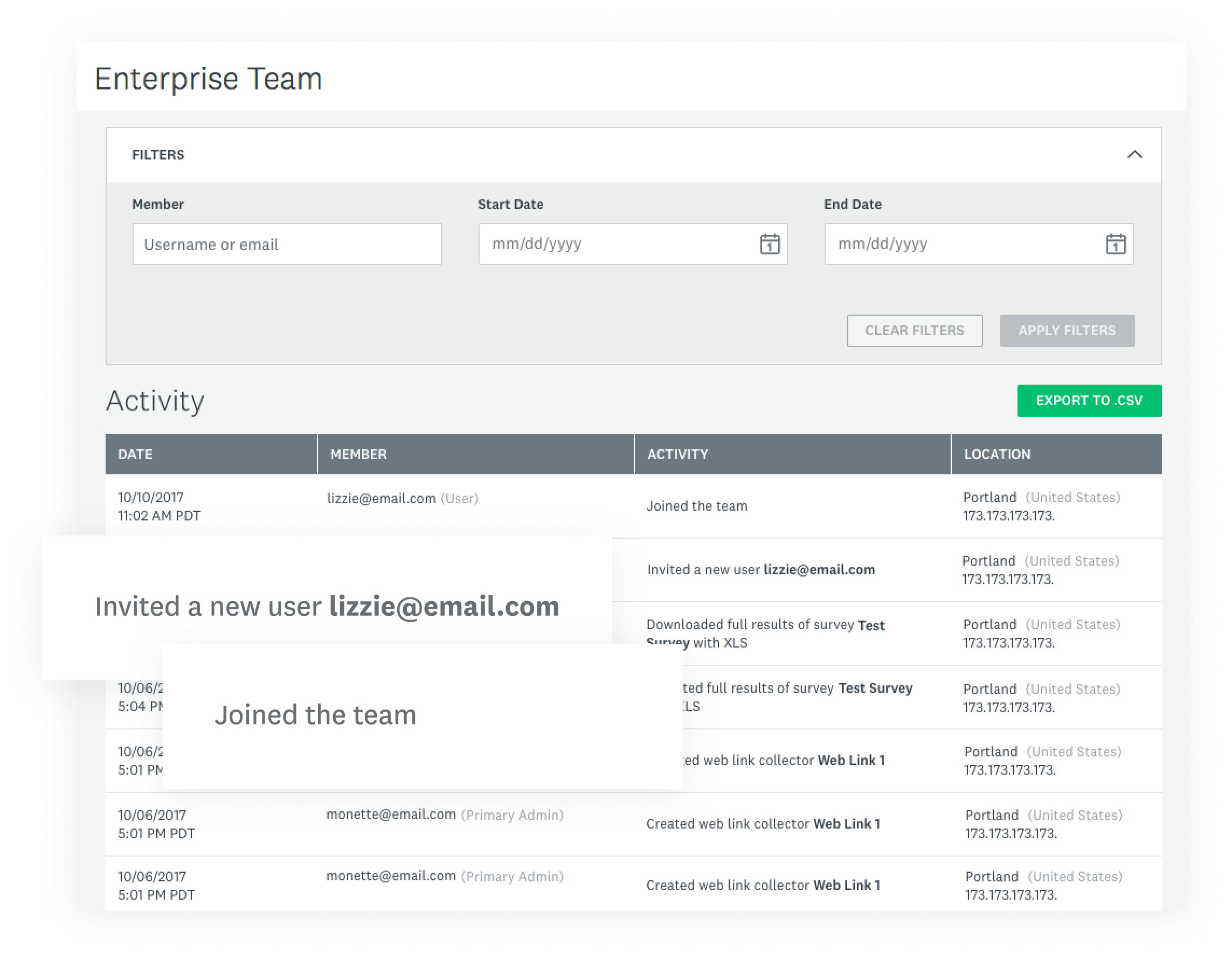
The activity log is an Enterprise feature that acts as a centralized stream of all user activity within a team and organization.
Currently, the activity log only records:
- the date and time an action occurred
- the name of the team member
- an overview of what happened
- the location of the activity.
THE USERS
Understanding Enterprise Admins
I browsed existing research documents on the Admin experience and persona.
Main tasks
Make renewal decisions, monitor systems, and usage, seat management for teams, manage integrations and investigate user issues.
Gains
Low maintenance experience, efficiency, information density (scannable), familiarity, and consistency
Interaction behaviour
Repetitive and recurring task behaviour
Activity log usage
Initially, I thought Admins were the sole user of the Activity log.
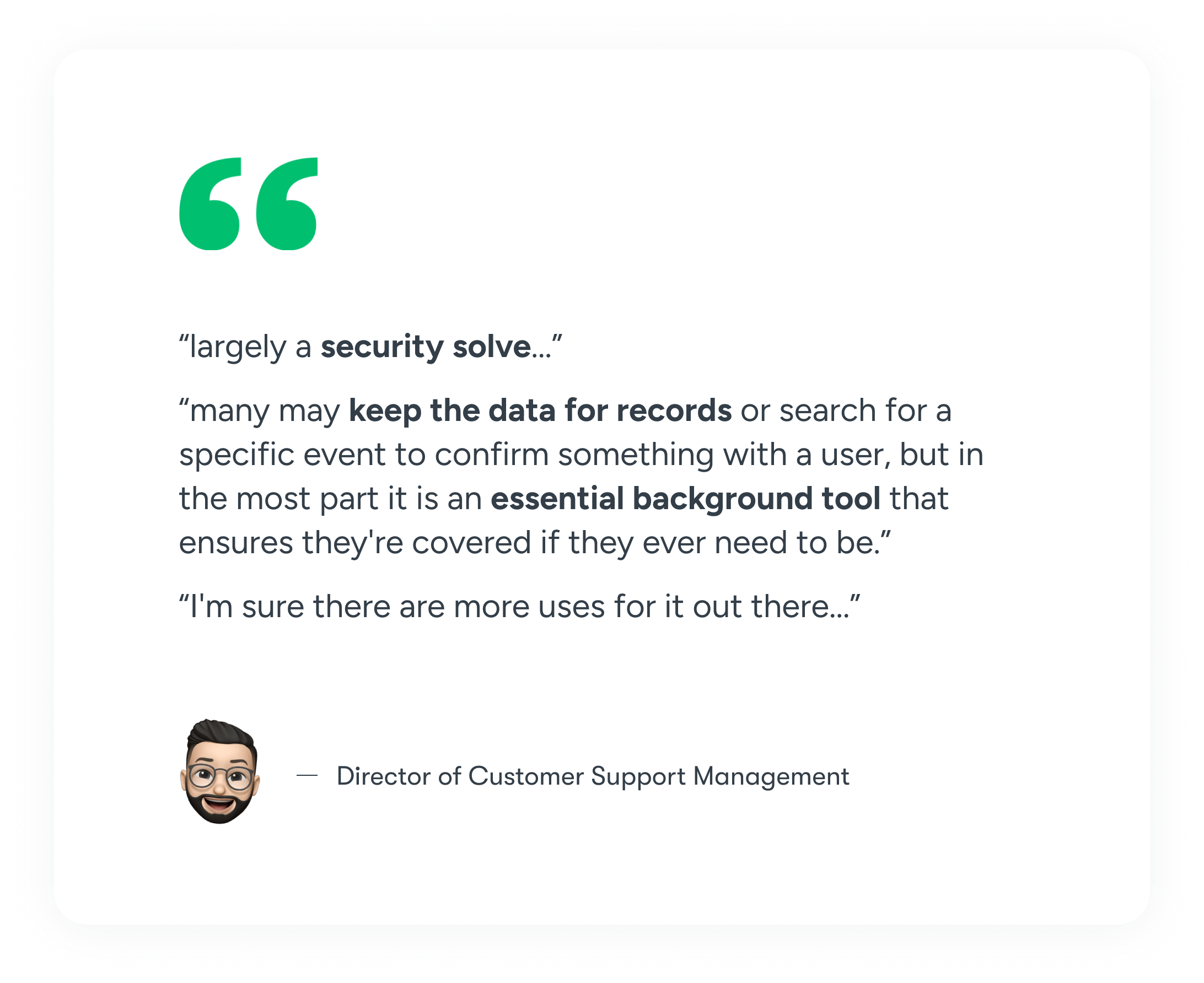
As Admins were less accessible, I came to the realization that SVMK Customer Support Managers (CSMs) were also frequent users of the feature as well as they support Admins with their issues.
I verified this and contacted some CSMs within the company on Slack to ask about their experience speaking with users about the Activity log.
GATHER & DEFINE
Enterprise admins need a way to efficiently use the activity log to investigate specific issues and export logs for security records.
As the project champion, I led and conducted meetings with my cross-functional team to define project goals for the MVP, discuss stretch goals, and identify success metrics.
MVP Scope

Add a new activity type filter
Migrate page to Web Platform using new design system components
Other small changes & stretch goals (wider table width, infinite scrolling, data recency info)
DESIGN
Designing a new activity filter
After investigating, I learned that there are 30 different activity types that were already bucketed into 5 categories 1. Sign-ins and sign-outs, 2. Surveys, 3. Collaboration, 4. Collectors (Learn about collectors) and 5. App installs.
With this information, I was off to designing!
Single select vs Multi-select
Single select

Greater ease of selection
Less scrolling within filter

Less granular search capabilities
Less efficient search


SELECTED

Multi-select
More powerful search capabilities
Better matches users’ searching behaviours
Less efficient filtering
Multi-select filter

Expandable categories
Less overwhelming
Extra work to expand sections to scan options
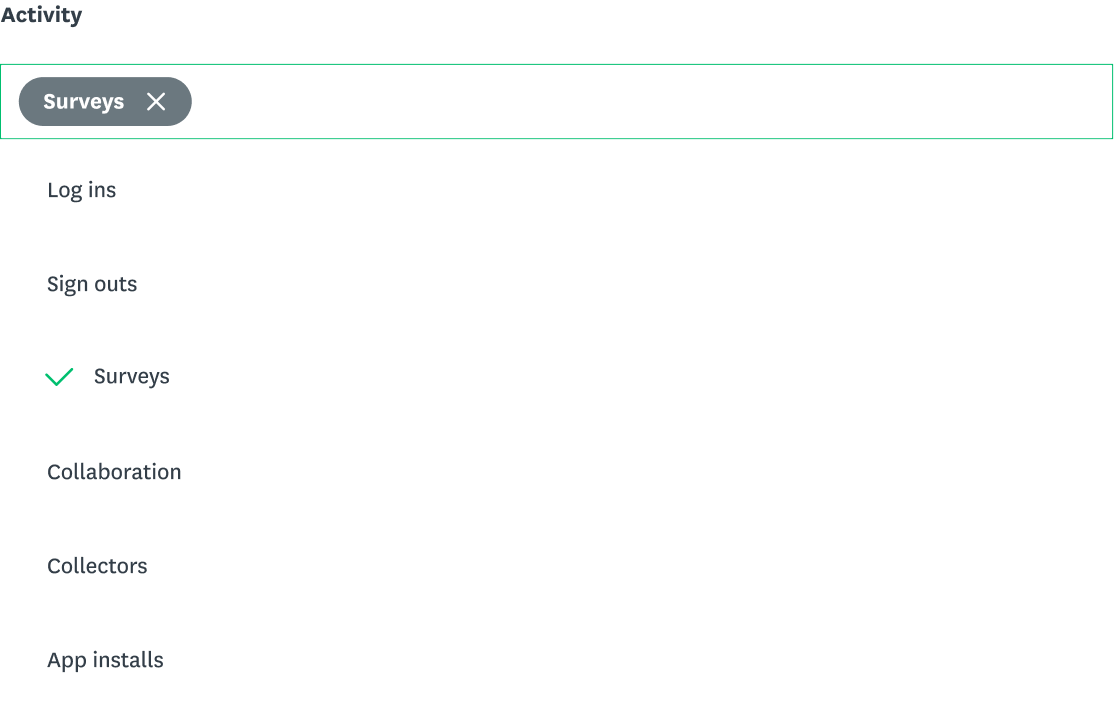
Non-exhaustive activity list
Less overwhelming
Less granular searching capabilities
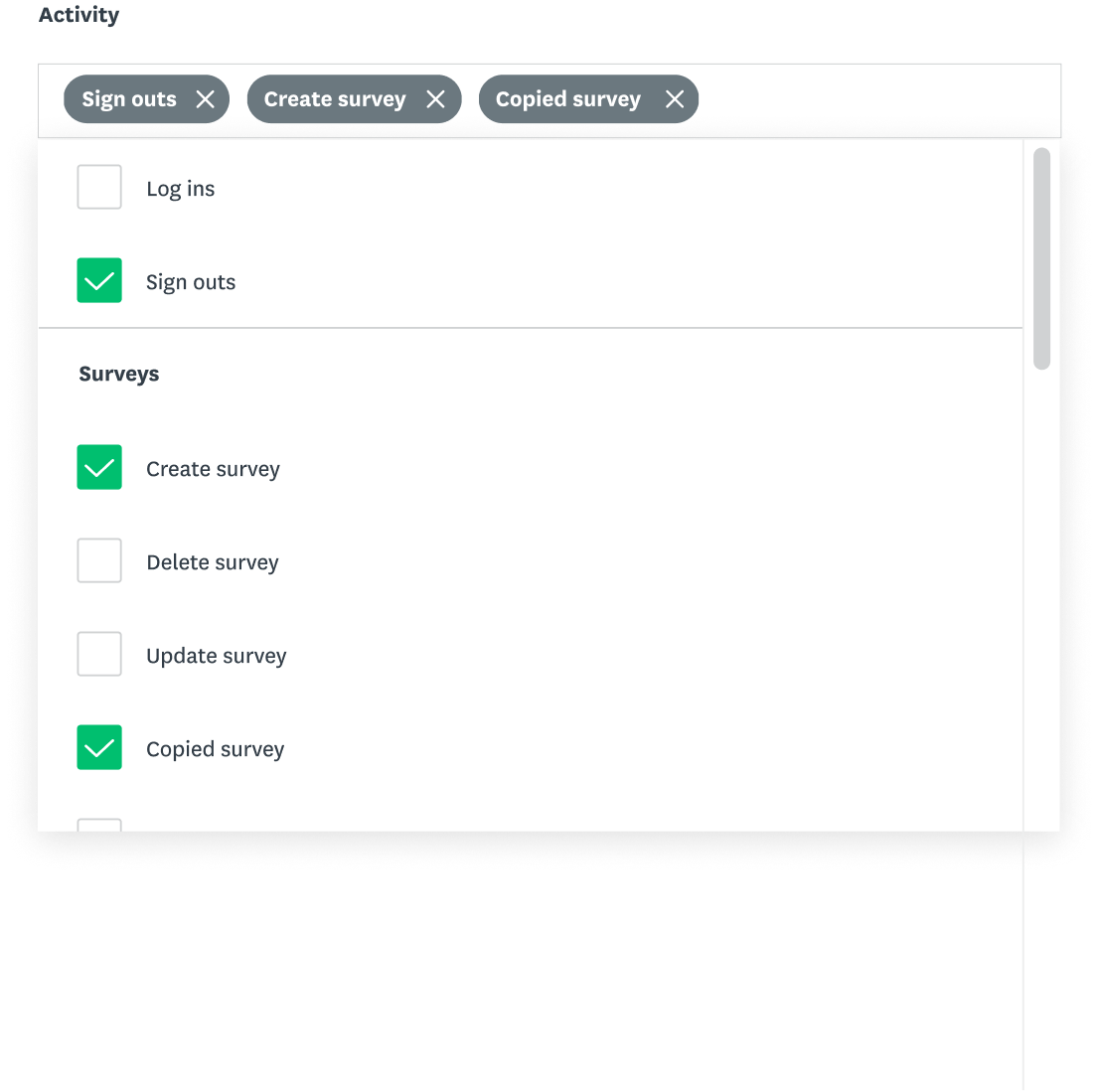
SELECTED
Checkboxes + Categories
Checkboxes create greater affordance for multi-selection
Greater scannability
Task-efficient
Less efficient filtering
TESTING
Testing my assumptions
While designing and attending design critiques, I recognized I was making a lot of assumptions about users. I sought to refine my understanding of admins and activity log usage through a card sorting study and concept testing.
Research goals
- Validate existing use cases of the activity log and identify potential ones
- Determine logical groupings of all 30 activity types
- Identify the importance and potential usage of each activity type within the filter relative to one another
- Test the usability of the medium-fidelity prototype
Participants
5 Enterprise Customer support managers (CSMs)
Method
Card sorting study and usability testing.
Tools
Google Jamboard, Figma
Timeline
2 weeks
User interviews
Participants were asked a list of preliminary questions all about the activity log, mainly to learn about their experiences with using the feature and how they’ve seen Admins use it.
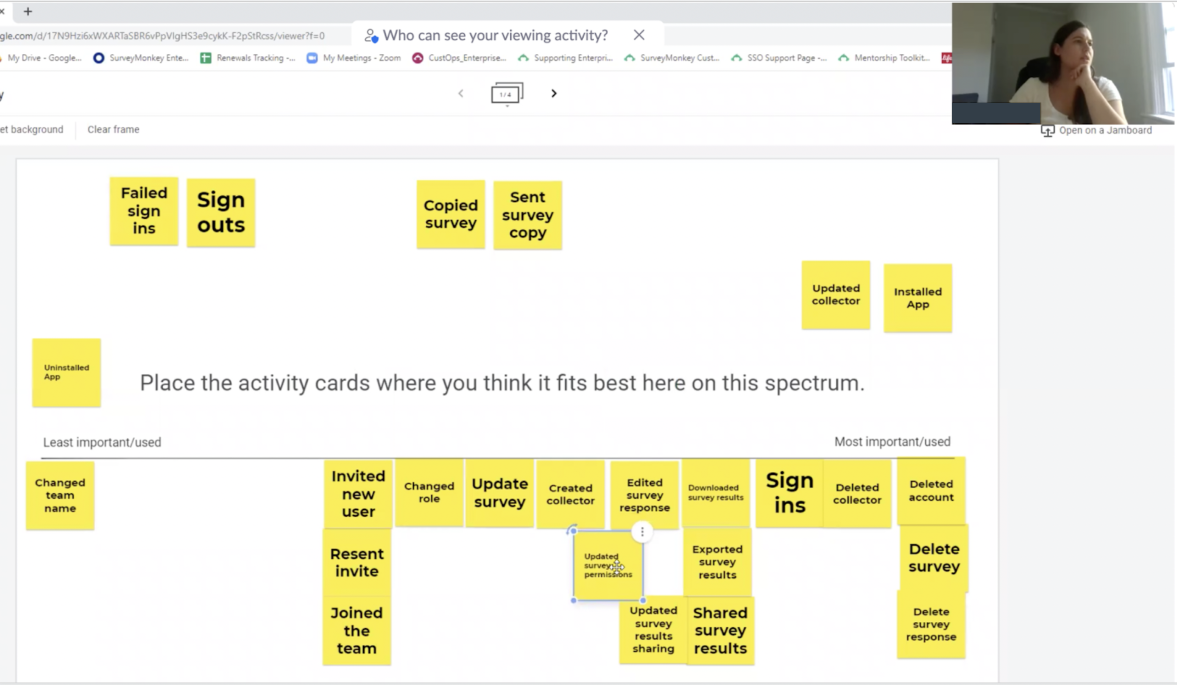
Card sorting study
Participants were instructed to place each activity type on a spectrum based on how important/used they think this activity would be to filter by in the activity log.
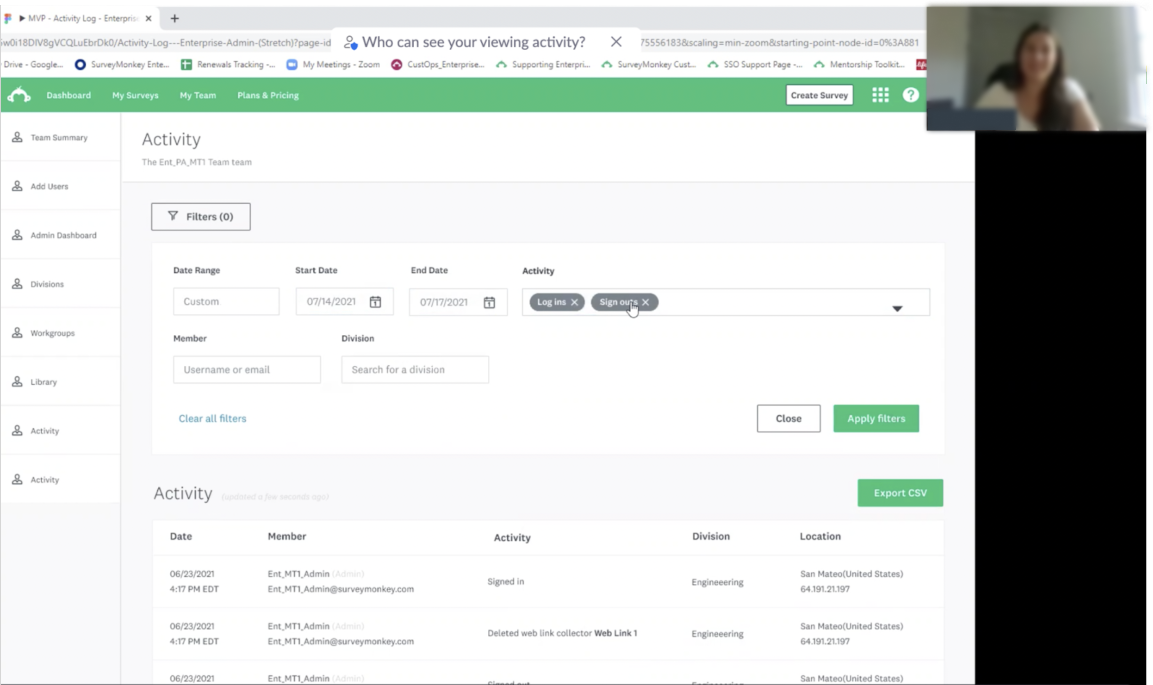
Usability testing
Participants were given a series of tasks to complete on the prototype while thinking aloud throughout their experience.
Results
Analyzing the results
Exporting
Exporting was a recurring behaviour and was important for security measures.
Other use cases such analyzing usage data and investigating issues and incidents were validated to be true as well.
Logical groupings
User groupings of activity types matched existing groupings
The “Collaboration” category was referred to as “Account management” by 3/5 participants.
Deletions
Deletion activities such as deleting surveys, accounts, etc were found to be the most important and common activities Admins usually look for
App installs were also noted by 2 CSMs as an important activity that informs renewal decisions.
Other sentiments
- The activity log is a powerful tool that is under-utilized and lacks awareness
- Several participants were wondering if there was a Select All option
- 5/5 Participants believe the new activity filter will be useful for admins.
My impact
Since leaving my internship, my designs have shipped to 100%. Along the way, I redefined the value of the activity log from a business and user perspective.
My work and research on the activity log also opened up several opportunities for future improvements, as well as created a foundation for all other tables to migrate to the new design system. This includes how the activity log can integrate with a notification system and how we can leverage this data to better visualize the ROI of the Survey Monkey platform to users.
70
screens designed
16
edge cases designed for
300+
questions asked
Key takeaways
Feedback is fuel
I really only want to show my best work but I've learned to be comfortable showing my work at all its stages.
Don't design in a bubble
I may have only been designing for a small corner in the product but I realized the importance of thinking about its connection to the overall product ecosystem.
Embrace your non-traditional design path
Thanks to my mentor and manager, I've learned to not succumb to self-limiting beliefs and understand how my unique background can be my greatest asset.

Reimagining the activity log
As a Product Design Intern, I championed a redesign project of the Activity Log to migrate it to the new design system, increase design efficiency for future migrations, and make it more functional for tens of thousands of Enterprise Admins.
Throughout these four months, I got the opportunity to plan and conduct research studies, lead meetings with cross-functional partners, and see a design to ship.
Role
Product Design Intern
Type
B2B Saas Web
Responsibilities
User Research, Content Design, Concept Testing, Design Systems, Wireframing & Prototyping
Tools
Figma, Abstract, Google Drawing
The Problem
How might we make the Activity Log more functional for Enterprise admins?
Current State
What is the activity log?
The activity log is an Enterprise feature that acts as a centralized stream of all user activity within a team and organization.
Currently, the activity log only records:
- the date and time an action occurred
- the name of the team member
- an overview of what happened
- the location of the activity.
Users
Understanding Enterprise Admins
I browsed existing research documents on the Admin experience and persona.
Main tasks
Make renewal decisions, monitor systems, and usage, seat management for teams, manage integrations and investigate user issues.
Gains
Low maintenance experience, efficiency, information density (scannable), familiarity, and consistency
Interaction behaviour
Repetitive and recurring task behaviour
Activity log usage
Initially, I thought Admins were the sole user of the Activity log.
As Admins were less accessible, I came to the realization that SVMK Customer Support Managers (CSMs) were also frequent users of the feature as well as they support Admins with their issues.
I verified this and contacted some CSMs within the company on Slack to ask about their experience speaking with users about the Activity log.
Define
Enterprise admins need a way to efficiently use the activity log to investigate specific issues and export logs for security records.
As the project champion, I led and conducted meetings with my cross-functional team to define project goals for the MVP, discuss stretch goals, and identify success metrics.
MVP Scope
Add a new activity type filter
Migrate page to Web Platform using new design system components
Other small changes & stretch goals (wider table width, infinite scrolling, data recency info)
Design
Designing a new activity filter
After investigating, I learned that there are 30 different activity types that were already bucketed into 5 categories 1. Sign-ins and sign-outs, 2. Surveys, 3. Collaboration, 4. Collectors (Learn about collectors) and 5. App installs.
With this information, I was off to designing!
Single select vs Multi-select
Single select
Greater ease of selection
Less scrolling within filter
Less granular search capabilities
Less efficient search
SELECTED
Multi-select
More powerful search capabilities
Better matches users’ searching behaviours
Less efficient filtering
Multi-select filter
Expandable categories
Less overwhelming
Extra work to expand sections to scan options
Non-exhaustive activity list
Less overwhelming
Less granular searching capabilities
SELECTED
Checkboxes + Categories
Checkboxes create greater affordance for multi-selection
Greater scannability
Task-efficient
Less efficient filtering
Testing
Testing my assumptions
While designing and attending design critiques, I recognized I was making a lot of assumptions about users. I sought to refine my understanding of admins and activity log usage through a card sorting study and concept testing.
User interviews
Participants were asked a list of preliminary questions all about the activity log, mainly to learn about their experiences with using the feature and how they’ve seen Admins use it.
Card sorting study
Participants were instructed to place each activity type on a spectrum based on how important/used they think this activity would be to filter by in the activity log.
Usability testing
Participants were given a series of tasks to complete on the prototype while thinking aloud throughout their experience.
Results
Analyzing the results
Exporting
Exporting was a recurring behaviour and was important for security measures.
Other use cases such analyzing usage data and investigating issues and incidents were validated to be true as well.
Logical groupings
User groupings of activity types matched existing groupings
The “Collaboration” category was referred to as “Account management” by 3/5 participants.
Deletions
Deletion activities such as deleting surveys, accounts, etc were found to be the most important and common activities Admins usually look for
App installs were also noted by 2 CSMs as an important activity that informs renewal decisions.
Other sentiments
- The activity log is a powerful tool that is under-utilized and lacks awareness
- Several participants were wondering if there was a Select All option
- 5/5 Participants believe the new activity filter will be useful for admins.
Research goals
- Validate existing use cases of the activity log and identify potential ones
- Determine logical groupings of all 30 activity types
- Identify the importance and potential usage of each activity type within the filter relative to one another
- Test the usability of the medium-fidelity prototype
Participants
5 Enterprise Customer support managers (CSMs)
Method
Card sorting study and usability testing.
Tools
Google Jamboard, Figma
Timeline
2 weeks
The final design
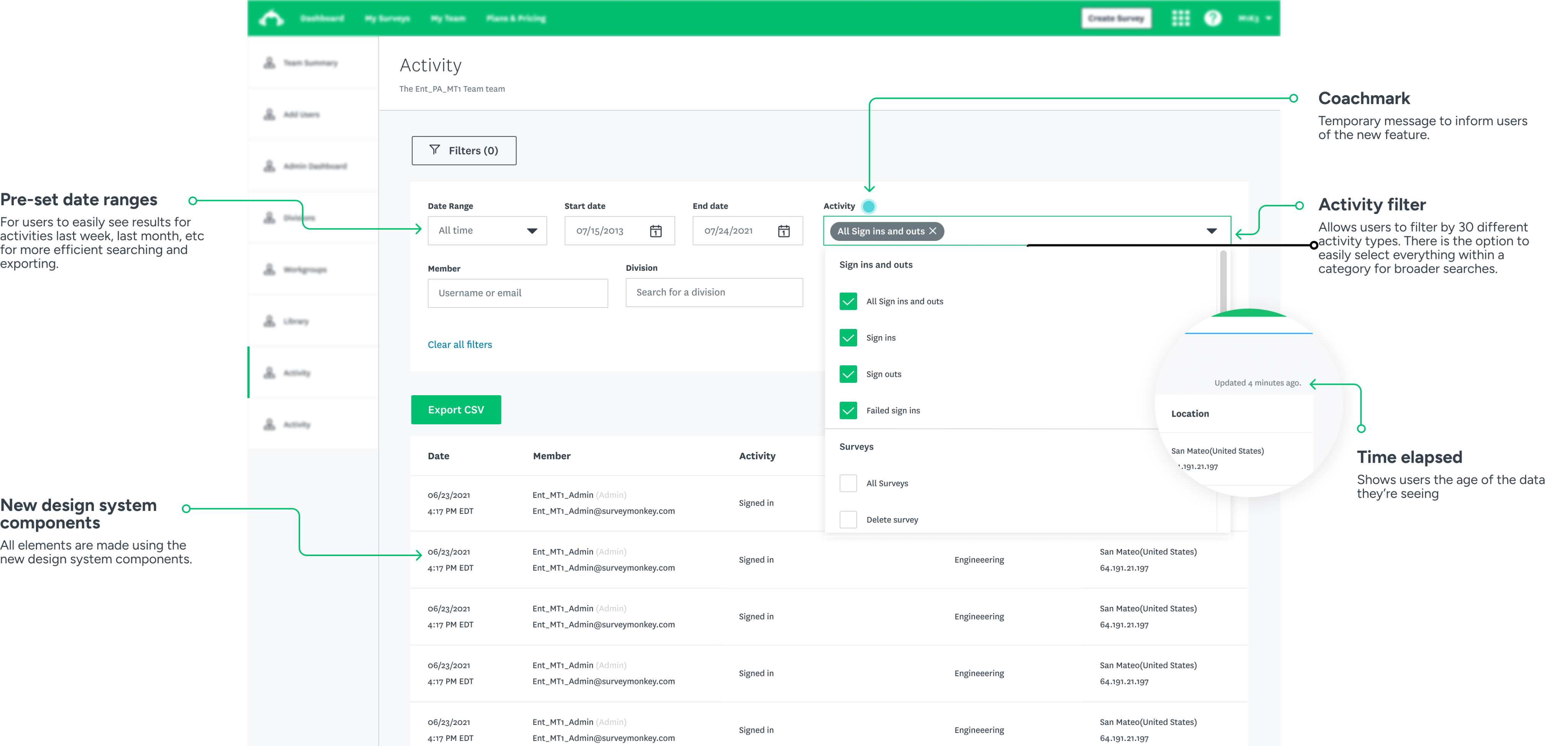
I revised the order & labels of the activity types based on the data and added a new filter for pre-set date ranges for easy habitual exports and Select All option for categories.
After several iterations, design critiques, and cross-functional meetings, I finalized the designs to hand off to ship! A handoff document was created which included all interactions, edges cases, and other notes about the behavior of the new feature.
My impact
Since leaving my internship, my designs have shipped to 100%. Along the way, I redefined the value of the activity log from a business and user perspective.
My work and research on the activity log also opened up several opportunities for future improvements, as well as created a foundation for all other tables to migrate to the new design system. This includes how the activity log can integrate with a notification system and how we can leverage this data to better visualize the ROI of the Survey Monkey platform to users.
70
screens designed
16
edge cases designed for
300+
questions asked
Key takeaways
Feedback is fuel
I really only want to show my best work but I've learned to be comfortable showing my work at all its stages.
Don't design in a bubble
I may have only been designing for a small corner in the product but I realized the importance of thinking about its connection to the overall product ecosystem.
Embrace your non-traditional design path
Thanks to my mentor and manager, I've learned to not succumb to self-limiting beliefs and understand how my unique background can be my greatest asset.


Reimagining the activity log
As a Product Design Intern, I championed a redesign project of the Activity Log to migrate it to the new design system, increase design efficiency for future migrations, and make it more functional for tens of thousands of Enterprise Admins.
Throughout these four months, I got the opportunity to plan and conduct research studies, lead meetings with cross-functional partners, and see a design to ship.
Role
Product Design Intern
Type
B2B Saas Web
Responsibilities
User Research, Content Design, Concept Testing, Design Systems, Wireframing & Prototyping
Tools
Figma, Abstract, Google Drawing
The Problem
How might we make the Activity Log more functional for Enterprise admins?
Current State
What is the activity log?
The activity log is an Enterprise feature that acts as a centralized stream of all user activity within a team and organization.
Currently, the activity log only records:
- the date and time an action occurred
- the name of the team member
- an overview of what happened
- the location of the activity.
Users
Understanding Enterprise Admins
I browsed existing research documents on the Admin experience and persona.
Main tasks
Make renewal decisions, monitor systems, and usage, seat management for teams, manage integrations and investigate user issues.
Gains
Low maintenance experience, efficiency, information density (scannable), familiarity, and consistency
Interaction behaviour
Repetitive and recurring task behaviour
Activity log usage
Initially, I thought Admins were the sole user of the Activity log.
As Admins were less accessible, I came to the realization that SVMK Customer Support Managers (CSMs) were also frequent users of the feature as well as they support Admins with their issues.
I verified this and contacted some CSMs within the company on Slack to ask about their experience speaking with users about the Activity log.
Define
Enterprise admins need a way to efficiently use the activity log to investigate specific issues and export logs for security records.
As the project champion, I led and conducted meetings with my cross-functional team to define project goals for the MVP, discuss stretch goals, and identify success metrics.
MVP Scope
Add a new activity type filter
Migrate page to Web Platform using new design system components
Other small changes & stretch goals (wider table width, infinite scrolling, data recency info)
Design
Designing a new activity filter
After investigating, I learned that there are 30 different activity types that were already bucketed into 5 categories 1. Sign-ins and sign-outs, 2. Surveys, 3. Collaboration, 4. Collectors (Learn about collectors) and 5. App installs.
With this information, I was off to designing!
Single select vs Multi-select
Single select
Greater ease of selection
Less scrolling within filter
Less granular search capabilities
Less efficient search
SELECTED

Multi-select
More powerful search capabilities
Better matches users’ searching behaviours
Less efficient filtering
Multi-select filter
Expandable categories
Less overwhelming
Extra work to expand sections to scan options
Non-exhaustive activity list
Less overwhelming
Less granular searching capabilities
SELECTED
Checkboxes + Categories
Checkboxes create greater affordance for multi-selection
Greater scannability
Task-efficient
Less efficient filtering
Testing
Testing my assumptions
While designing and attending design critiques, I recognized I was making a lot of assumptions about users. I sought to refine my understanding of admins and activity log usage through a card sorting study and concept testing.
Research goals
- Validate existing use cases of the activity log and identify potential ones
- Determine logical groupings of all 30 activity types
- Identify the importance and potential usage of each activity type within the filter relative to one another
- Test the usability of the medium-fidelity prototype
Participants
5 Enterprise Customer support managers (CSMs)
Method
Card sorting study and usability testing.
Tools
Google Jamboard, Figma
Timeline
2 weeks
User interviews
Participants were asked a list of preliminary questions all about the activity log, mainly to learn about their experiences with using the feature and how they’ve seen Admins use it.
Card sorting study
Participants were instructed to place each activity type on a spectrum based on how important/used they think this activity would be to filter by in the activity log.
Usability testing
Participants were given a series of tasks to complete on the prototype while thinking aloud throughout their experience.
Results
Analyzing the results
Exporting
Exporting was a recurring behaviour and was important for security measures.
Other use cases such analyzing usage data and investigating issues and incidents were validated to be true as well.
Logical groupings
User groupings of activity types matched existing groupings
The “Collaboration” category was referred to as “Account management” by 3/5 participants.
Deletions
Deletion activities such as deleting surveys, accounts, etc were found to be the most important and common activities Admins usually look for
App installs were also noted by 2 CSMs as an important activity that informs renewal decisions.
Other sentiments
- The activity log is a powerful tool that is under-utilized and lacks awareness
- Several participants were wondering if there was a Select All option
- 5/5 Participants believe the new activity filter will be useful for admins.
The final design
I revised the order & labels of the activity types based on the data and added a new filter for pre-set date ranges for easy habitual exports and Select All option for categories.
After several iterations, design critiques, and cross-functional meetings, I finalized the designs to hand off to ship! A handoff document was created which included all interactions, edges cases, and other notes about the behaviour of the new feature.
My impact
Since leaving my internship, my designs have shipped to 100%. Along the way, I redefined the value of the activity log from a business and user perspective.
My work and research on the activity log also opened up several opportunities for future improvements, as well as created a foundation for all other tables to migrate to the new design system. This includes how the activity log can integrate with a notification system and how we can leverage this data to better visualize the ROI of the Survey Monkey platform to users.
70
screens designed
16
edge cases designed for
300+
questions asked
Key takeaways
Feedback is fuel
I really only want to show my best work but I've learned to be comfortable showing my work at all its stages.
Don't design in a bubble
I may have only been designing for a small corner in the product but I realized the importance of thinking about its connection to the overall product ecosystem.
Embrace your non-traditional design path
Thanks to my mentor and manager, I've learned to not succumb to self-limiting beliefs and understand how my unique background can be my greatest asset.